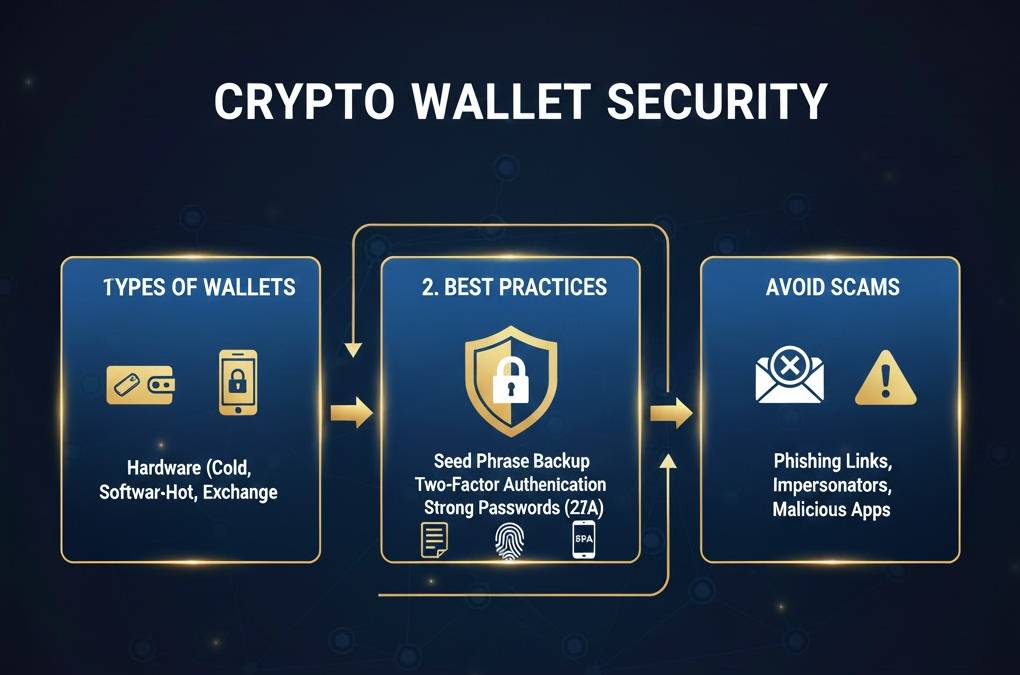
Crypto Wallet Security: Best Practices to Protect Your Assets
Secure your cryptocurrency wallet: understand private keys, seed phrases, best practices, and how to protect your assets from theft and loss.
Crypto Wallet Security: Protect Your Assets
Cryptocurrency wallet security is paramount. Unlike traditional banks with FDIC protection, lost cryptocurrency is often gone forever. This comprehensive guide explains how wallets work, security threats, best practices, and strategies to protect your digital assets from theft, loss, and compromise.
Understanding Cryptocurrency Wallets
How Wallets Work
A cryptocurrency wallet isn't actually a wallet in the traditional sense—it doesn't store coins. Instead, wallets store cryptographic keys that prove ownership and allow spending of cryptocurrencies on the blockchain.
The blockchain records all transactions. Your wallet contains the private key proving you own the cryptocurrency. Whoever controls the private key controls the funds—there's no bank, company, or authority that can override this.
Public Key vs. Private Key
Public Key (Address):
- Shared publicly; anyone can see it
- Used to receive cryptocurrency
- Similar to a bank account number—safe to share
- Derived from private key, but private key can't be derived from public key
Private Key:
- Secret; only you should know it
- Used to spend and transfer cryptocurrency
- Similar to a password combined with biometric access
- Anyone with the private key can spend your funds
- Cannot be recovered if lost
Example: Your Bitcoin address (public key) is 1A1z7agoat45Ws8w9eR8aw8asdjf. You can share this freely. Your private key is a 256-bit number—if someone obtains it, they control your Bitcoin forever.
Seed Phrase
A seed phrase (also called mnemonic or recovery phrase) is a human-readable way to generate and recover private keys. Most modern wallets use 12 or 24 word seed phrases.
Example: "abandon ability able about above absence absorb abstract abundance accept access accident account achieve acknowledge across"
Your seed phrase:
- Generates all your private keys
- Can recover your entire wallet if lost
- Must be kept secret like a private key
- Is language-independent (words from standardized list)
- Can be written down and stored securely
Types of Wallets
Hardware Wallets
Hardware wallets are dedicated physical devices storing private keys offline. Examples: Ledger, Trezor, SafePal.
Advantages:
- Most secure option available
- Private keys never exposed to internet
- Resistant to malware and hacking
- Recovery via seed phrase if device lost
- Support multiple cryptocurrencies
Disadvantages:
- Costs $50-150 per device
- Slower for frequent transactions
- Hardware can malfunction
- Supply chain attacks are theoretical but possible
Best for: Long-term storage of significant assets, maximum security.
Cold Wallets (Software)
Cold wallets are software wallets not connected to internet. Examples: Electrum (offline mode), Wasabi, Sparrow.
Advantages:
- High security when properly air-gapped
- Free to set up
- Good control over private keys
- Can store extremely large amounts
Disadvantages:
- Requires technical knowledge
- More complex to use than hardware wallets
- Risk of user error in setup
- Vulnerable if computer is compromised
Best for: Tech-savvy users holding substantial amounts, willing to trade convenience for security.
Hot Wallets (Software)
Hot wallets are internet-connected software wallets. Examples: MetaMask, Trust Wallet, Phantom.
Advantages:
- Very convenient for frequent transactions
- Easy to use, beginner-friendly
- Free to set up
- Access from multiple devices
Disadvantages:
- Private keys on internet-connected device
- Vulnerable to malware, phishing, hacking
- Subject to browser extension hacks
- Less secure for large amounts
Best for: Small amounts for active trading, DeFi interaction, convenience over maximum security.
Exchange Wallets (Custodial)
Leaving cryptocurrency on exchanges (Coinbase, Kraken, Binance) means the exchange controls your funds.
Advantages:
- Easiest for beginners
- Insurance/FDIC protection (some exchanges)
- Quick access to trade
- No private key management needed
Disadvantages:
- Exchange controls your funds, not you
- Exchange hack puts assets at risk
- Exchange shutdown or bankruptcy risks
- KYC and regulatory compliance required
- Maximum security isn't prioritized
Best for: Beginners, trading actively, amounts you're comfortable leaving on an exchange.
Multi-Signature Wallets
Multi-sig wallets require multiple private keys to authorize transactions. For example, a 2-of-3 multi-sig requires 2 of 3 private keys to sign off.
Advantages:
- Extra security—theft requires multiple compromises
- Redundancy—can still access funds if one key is lost
- Distributed trust among multiple parties
Disadvantages:
- More complex setup and management
- Slower transactions (requiring multiple signers)
- Additional costs (premium wallets/services)
Best for: Institutional use, very high-value holdings, shared control requirements.
Seed Phrase Security
Why Seed Phrases Matter
Your seed phrase is the ultimate control mechanism for your wallet. Anyone with your 12-24 word phrase can access all your private keys and steal everything. Protecting your seed phrase is your #1 security priority.
Never Store Seed Phrases Digitally
CRITICAL RULE: Never store seed phrases on internet-connected devices. This includes:
- Email accounts (even with encryption)
- Cloud storage (Google Drive, iCloud, Dropbox)
- Note-taking apps (Evernote, OneNote)
- Screenshot files
- Password managers (debatable—some use them, but risky)
- USB drives on a computer
Any digital storage can be hacked, malware can exfiltrate data, and services can be compromised. Digital storage is never truly secure.
Proper Seed Phrase Storage
Write It Down:
- Write your seed phrase on paper with pen
- Use waterproof materials if concerned about damage
- Store in a safe place (home safe, safe deposit box)
- Keep physically secure and private
Metal Storage:
- Etch seed phrase onto metal plates
- Products like Billfodl, Cryptosteel, HODL
- Fireproof and flood-resistant
- Permanent and difficult to destroy
Backup Redundancy:
- Never keep only one copy
- Create at least 2-3 backup copies
- Store backups in geographically separated locations
- One backup at home, one in safe deposit box or with trusted person
What NOT to Do With Seed Phrases
- Never type it into any website or app (unless creating wallet)
- Never send it via email, text, or messaging
- Never type it on a computer keyboard (especially compromised computers)
- Never photograph it with your phone (photos are cloud-synced)
- Never tell anyone about it (including support staff)
- Never use it on untrusted devices or networks
Common Security Threats
Phishing Attacks
Phishing involves fraudulent websites or communications mimicking legitimate services. A hacker creates a fake MetaMask login page, you enter your seed phrase thinking you're logging into the real wallet, and the hacker steals everything.
Prevention:
- Always verify URLs carefully (metamask.io, not metmask.io)
- Never enter seed phrase on any website
- Use hardware wallets for large transactions
- Be skeptical of unsolicited messages
- Enable 2FA on exchange accounts
Malware
Malware on your computer can monitor keyboard input, log in to wallet accounts, and steal cryptocurrency.
Prevention:
- Keep operating system updated
- Use reputable antivirus software
- Don't download suspicious files or files
- Use hardware wallets to avoid computer compromise impact
- Air-gap cold wallets completely
Supply Chain Attacks
A compromised hardware wallet manufacturing or delivery could result in stolen funds. Extremely rare but possible.
Prevention:
- Buy hardware wallets from official retailers
- Verify security holograms and packaging
- Verify firmware authenticity
- Use already-established hardware wallets with good security track records
Social Engineering
Scammers pose as support staff or trusted advisors, convincing you to share private keys or seed phrases.
Prevention:
- Remember: real support will never ask for seed phrases or private keys
- Be skeptical of unsolicited messages
- Verify contact through official channels
- Educate yourself on common scams
Exchange Hacks
Cryptocurrency exchanges have been hacked numerous times (Mt. Gox, Binance, Kraken, Coinbase have all experienced breaches).
Prevention:
- Don't keep funds on exchanges long-term
- Use exchanges with strong security records
- Enable 2FA on all accounts
- Move funds to personal wallets regularly
Lost or Forgotten Passwords
Forgetting your wallet password can lock you out of your funds (though seed phrase can recover them).
Prevention:
- Store passwords securely in password manager
- Don't rely on memory alone
- Use seed phrase recovery if password forgotten
Best Practices for Wallet Security
1. Use Hardware Wallets for Large Amounts
If holding more than $10,000-50,000, a hardware wallet becomes worthwhile. The cost ($100) is tiny compared to the security benefit.
2. Implement the Multi-Wallet Strategy
Divide your holdings:
- Cold storage (80-90%): Hardware wallet for long-term holding
- Warm storage (5-10%): Software cold wallet for medium-term or occasional access
- Hot wallet (1-5%): Small amount for daily transactions and DeFi
If your hot wallet is hacked, you lose only 1-5%, not your entire portfolio.
3. Enable 2FA on All Accounts
Two-factor authentication adds a second layer:
- Exchange accounts: Use authenticator app (Google Authenticator, Authy) rather than SMS
- Email accounts: Enable 2FA to prevent account takeover
- Wallet accounts: Enable if available
4. Use Strong, Unique Passwords
Each account needs a unique, 16+ character password with mixed case, numbers, and symbols. Use a password manager to track them.
5. Keep Firmware Updated
Hardware wallets release firmware updates fixing security vulnerabilities. Update your device when new versions are available.
6. Verify Addresses Carefully
Malware can intercept cryptocurrency addresses, replacing legitimate addresses with attacker addresses. Always verify the receiving address.
Never just copy-paste addresses: Malware can modify clipboard content. Instead:
- Display address on hardware wallet screen and compare
- Compare first and last 4-5 characters
- Use QR codes when possible
7. Keep Devices Clean
- Run antivirus software regularly
- Keep operating system and applications updated
- Avoid downloading files from untrusted sources
- Be cautious with browser extensions
8. Use Only Official Sources
Download wallets and tools only from:
- Official GitHub repositories
- Official websites
- Verified app stores (Apple, Google Play)
Never download from third-party sites claiming to have "better" versions.
9. Use Trusted Networks Only
Avoid accessing wallets or exchanges on:
- Public WiFi networks
- Unfamiliar computers
- Compromised networks
Use VPN if accessing from untrusted networks.
10. Test Your Recovery
Before storing large amounts, test that your seed phrase can recover your wallet:
- Put small amount in wallet
- Restore wallet from seed phrase on different device
- Verify funds are accessible
- This confirms your backup process works
Recovery and Disaster Planning
What If You Lose Your Hardware Wallet?
Your hardware wallet is just a physical device. Your funds are on the blockchain, controlled by your private key. If you lose the device:
- Use your seed phrase to restore on a new device
- All your funds are recovered
- The lost device can't be used without the PIN (hardware wallets have PINs)
What If You Forget Your Seed Phrase?
If your seed phrase is lost and you still have access to your wallet, you're fine. Your funds aren't lost—they're in your wallet.
However, if you need to recover from seed phrase later and don't have it, the funds are inaccessible forever. This is why redundant backups are critical.
What If You Get Hacked?
With hardware wallet: Move funds to new hardware wallet immediately. The old device is compromised, but your seed phrase can restore a new device.
With software wallet: If seed phrase is compromised, funds are lost. Move remaining funds to new wallet with new seed phrase immediately.
Setting Up Inheritance
Plan for what happens to your crypto if you die:
- Give trusted person/executor access to seed phrase (in secure location)
- Document wallet locations and instructions
- Consider multi-sig setup with family members
- Include cryptocurrency in will
Red Flags and Scams to Avoid
- "Recovery services": If you're offered to recover lost funds via someone else's recovery service, it's a scam
- Seed phrase requests: No legitimate service will ask for your seed phrase
- Unrealistic returns: "Double your Bitcoin" scams
- Celebrity endorsements: Elon Musk is not sending you free Bitcoin
- Urgent messages: "Act now or lose your funds" is a scam indicator
- Unclear fee structures: Legitimate wallets are transparent about fees
Wallet Security Checklist
- ☐ For large amounts, acquired hardware wallet (Ledger or Trezor)
- ☐ Wrote down seed phrase on paper
- ☐ Created at least 2 backup copies of seed phrase
- ☐ Stored backups in separate locations
- ☐ Set strong, unique password for wallet
- ☐ Enabled 2FA on exchange accounts
- ☐ Kept device firmware and software updated
- ☐ Used only official wallet sources
- ☐ Tested recovery process with small amount
- ☐ Educated myself on common scams
- ☐ Never shared seed phrase with anyone
- ☐ Verified receiving addresses before sending
Conclusion
Cryptocurrency wallet security is your personal responsibility. Unlike traditional banking with fraud protection and FDIC insurance, crypto theft and loss are permanent. The good news: with proper practices, your cryptocurrency can be extremely secure.
The key principles: use hardware wallets for large amounts, protect your seed phrase like your life depends on it, enable 2FA everywhere, never trust phishing sites, and maintain redundant backups. Follow these practices and your cryptocurrency is safer than money in most banks. Neglect them, and you risk losing everything to hackers or your own mistake.
Start today: if you haven't already, acquire a hardware wallet, set up proper backup procedures, and educate yourself on common threats. Your future self will thank you when your cryptocurrency remains safely yours for decades to come.